
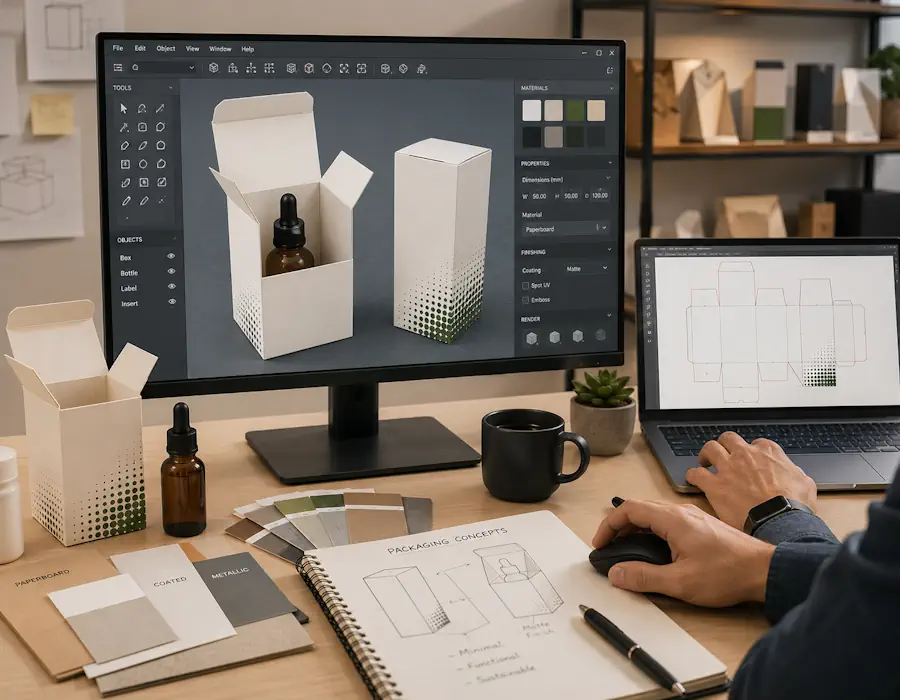
Packaging design work generally splits across two distinct software categories that most people outside the field don’t realize are separate: graphic design software for the visual, printed surface of a package, and structural or 3D design software for the actual shape and construction. Most real packaging design projects use both, since a finished package is never purely graphics or purely structure — it’s the two resolved together.
Graphic Design Software
This category handles the printed, visual side of packaging — logos, typography, color, label layout. Vector illustration software, most commonly Adobe Illustrator, is the standard for creating the flat artwork that gets printed onto a package, since vector graphics scale cleanly to any print size without quality loss. Layout software, like Adobe InDesign, handles more text-heavy or multi-panel design work, particularly useful for packaging with substantial required label content. Raster editing software, like Adobe Photoshop, is used for photo editing and texture work rather than the core design itself, typically supporting the vector and layout work rather than replacing it.
Structural and 3D Design Software
This category handles the actual shape, dimensions, and construction of a package — the dieline, the fold structure, how a box or carton is built. Specialized structural packaging software, such as ArtiosCAD, is purpose-built for creating dielines and structural packaging designs, widely used in the corrugated and folding carton industry specifically. General CAD software, more common for rigid packaging like bottles or custom molded structures, handles precise dimensional modeling for injection-molded or thermoformed packaging. 3D visualization and rendering software lets designers and clients see a realistic preview of how a design will look as a physical object before committing to production, which has become increasingly standard given how much a flat design can differ from its dimensional, folded, or molded final form.
AI and Emerging Tools
A growing number of tools now incorporate AI-assisted features — generating initial design concepts, automating variations for A/B testing, or assisting with structural layout suggestions. These tools are useful for early-stage concept generation and exploring more directions faster than manual work alone would allow, but they generally still require the same refinement and production-file preparation stage that traditional design software handles, rather than replacing the process end to end.
Free vs. Paid Options
Free and lower-cost options exist and can genuinely work for simpler projects — basic vector editing tools and free-tier design platforms handle straightforward label or flat-panel design reasonably well. For structural design specifically, though, the specialized software this work typically requires has less mature free alternatives, which is part of why structural packaging design more often involves either a paid software investment or working with an agency or manufacturer who already has that capability in-house.
Choosing Software Based on Your Project
The right software choice depends less on personal preference and more on what type of packaging design work you’re actually doing. A flat label or simple carton redesign is well within reach of standard graphic design software alone. A fully custom structural package — a unique box shape, a molded container — genuinely requires structural design software or a design partner who has it, since attempting that work in graphic design software alone produces designs that don’t translate reliably into a manufacturable structure.
Frequently Asked Questions
What software do professional packaging designers use?
Most professional packaging design work combines vector illustration software like Adobe Illustrator for graphics with specialized structural software like ArtiosCAD for dielines and structural design, particularly for custom packaging projects.
Is there free software for packaging design?
Yes, for basic graphic and label design work, though structural packaging design software with dieline and 3D capabilities generally has fewer mature free options compared to graphic design tools.
Do I need 3D software for packaging design?
It depends on the project — flat, simple designs can be handled with standard graphic design software, while any custom structural package benefits significantly from 3D visualization to catch issues before committing to production.
Can AI tools replace professional packaging design software?
Not entirely — AI-assisted tools are useful for early concept generation and exploring directions quickly, but production-ready packaging design still generally requires the precision and manufacturing-specific file preparation that traditional design software provides.


1 Comment