

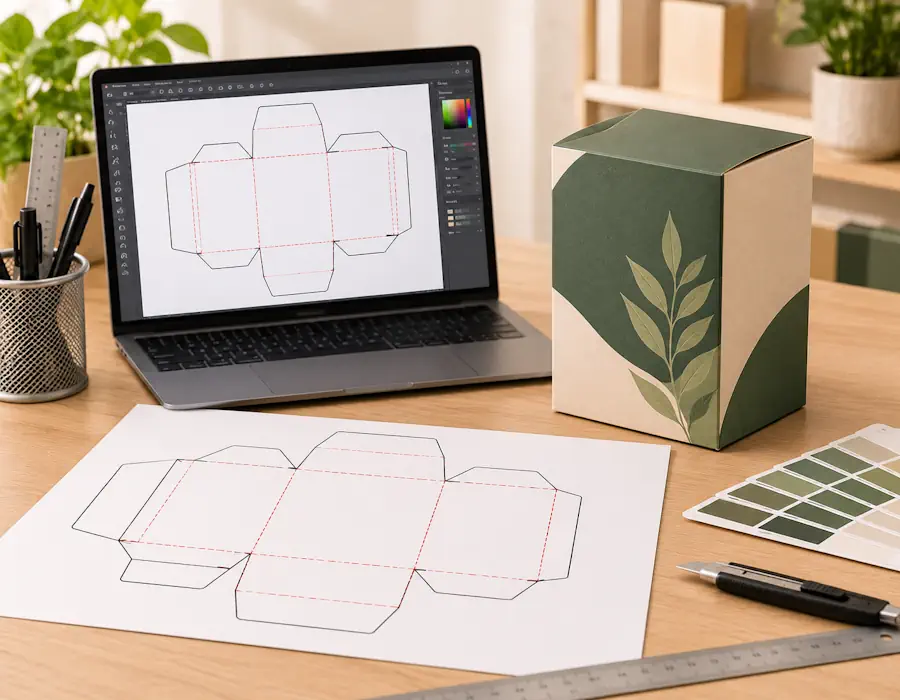
A dieline is the flat, two-dimensional blueprint of a package, showing exactly where it will be cut, folded, creased, and glued, and where artwork can safely go. It’s called a dieline because the lines mark the path of the cutting die that shapes the material in production. Every printed box or carton starts as a dieline, and mistakes in it are among the most common causes of reprints, which is why it comes up throughout the packaging design process.
What a Dieline Shows
A dieline isn’t a single line but a set of marks, each telling the printer or manufacturer something different. Cut lines mark where the die will cut through the material to form the outer shape and any openings. Fold or crease lines mark where the material will bend, and perforation lines mark tear-off or easy-open sections. Glue flaps show where panels attach to form the finished structure. Bleed is the extra artwork that extends past the cut line, so small shifts during cutting don’t leave a white edge. The safe area is the inner margin where important text and logos should stay, so nothing is trimmed or lost in a fold. Together these let a designer place artwork correctly and let the manufacturer produce the package exactly as intended.
Why Dielines Matter
Artwork designed without a dieline is guesswork. A logo that looks centered on a flat file can end up split across a fold, a barcode can fall on a crease, and text can run into a glue flap. The dieline is the shared reference between design and production, which is why structural and graphic design work best done together, as we describe in our packaging design guide. It also affects cost: an efficient structure that uses material well and lays out compactly on a press sheet is cheaper to produce than one that wastes board.
Where Dielines Come From
A dieline can come from a few sources. Structural design software lets a designer build a dieline for a specific package, and for custom structures this is usually the right route, using the tools we cover in our guide to packaging design software. A manufacturer or printer often supplies a template for their standard box and carton styles, which is the most reliable starting point because it matches what their equipment actually produces. Generic online templates are widely available for common box shapes and work as a starting point, but they’re approximations: the exact dimensions still need to be confirmed with whoever will make the packaging.
Common Dieline Mistakes
A handful of errors account for most dieline problems. Using a generic template without confirming it against the manufacturer’s specifications is the most frequent, since small dimensional differences in the template can mean the package doesn’t fit the product or assemble correctly. Artwork that crosses folds or sits too near a cut ignores the safe area and gets trimmed or distorted. Insufficient bleed leaves visible white slivers at the edges. And forgetting that material thickness changes the geometry matters more than people expect, because board has a real caliper that affects how panels fold and fit, which differs between paperboard cartons and corrugated boxes. Checking a physical prototype before a full print run catches most of these.
Frequently Asked Questions
What is a dieline in packaging?
A dieline is the flat blueprint of a package showing where it will be cut, folded, and glued, plus the bleed and safe areas for artwork. It guides both the designer and the manufacturer.
What's the difference between bleed and the safe area?
Bleed is artwork that extends past the cut line so small cutting shifts don’t leave a white edge. The safe area is the inner margin where key text and logos should stay so they aren’t trimmed or lost in a fold.
Can I use a free box template as a dieline?
You can use it as a starting point, but confirm the exact dimensions with your manufacturer before printing, since generic templates are approximations and small differences can cause fit or assembly problems.
Who creates the dieline for a custom package?
Often a structural designer using specialized software, or the manufacturer, who may supply a template for their standard styles. For custom structures, the dieline is usually developed alongside the design and checked with a prototype.